
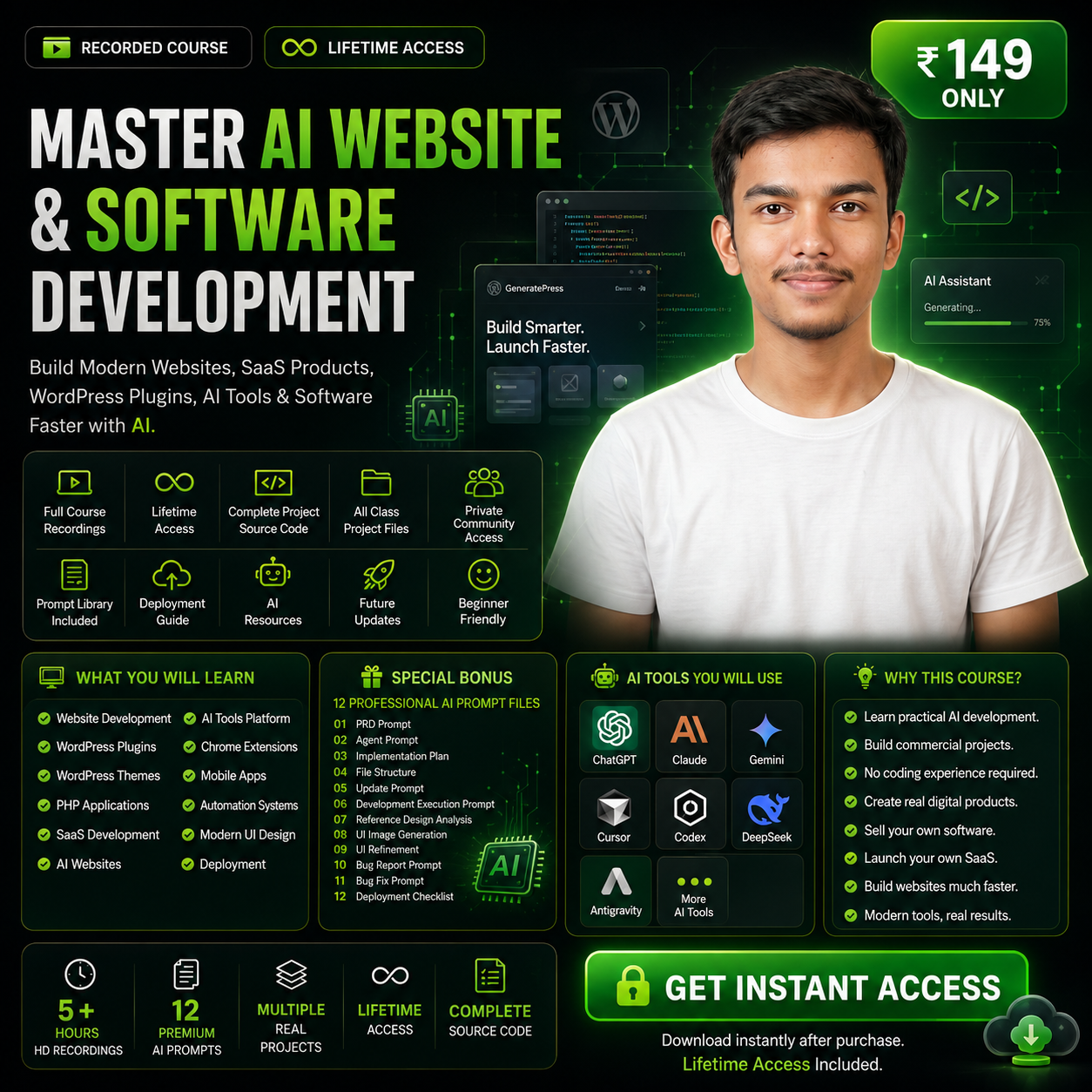
Complete AI Website & Software Development Live Class Recording
Get complete access to the recorded AI Website & Software Development Live Class and learn how to plan, design, build, debug, improve, and deploy professional digital projects using AI.
The package includes 5+ hours of practical live class recordings with Q&A, 16+ step-by-step AI development prompts, 12 essential prompt files, all available class project materials, deployment guidance, and private WhatsApp support group access

Created by Laba Das

Beginner Friendly

Practical Learning

Lifetime Access
₹9,999.00 Original price was: ₹9,999.00.₹149.00Current price is: ₹149.00.
-
Indian rupee (₹) - INR
-
United States dollar ($) - USD
Complete AI Website & Software Development Live Class Recording
Get complete access to the recorded AI Website & Software Development Live Class and learn how to plan, design, build, debug, improve, and deploy professional digital projects using AI.
The package includes 5+ hours of practical live class recordings with Q&A, 16+ step-by-step AI development prompts, 12 essential prompt files, all available class project materials, deployment guidance, and private WhatsApp support group access
Enrollment Ends In
Seats are limited — lock yours now
₹9,999.00 Original price was: ₹9,999.00.₹149.00Current price is: ₹149.00.
-
Indian rupee (₹) - INR
-
United States dollar ($) - USD
Created by Laba Das
Beginner Friendly
Practical Learning
Lifetime Access
Description
Learn the Complete AI Development Workflow at Your Own Pace
The live class has ended, but you can now access the complete recordings, practical demonstrations, AI prompts, project files, development materials, and support resources.
This recorded class is designed for anyone who wants to learn how professional websites, web applications, SaaS platforms, WordPress plugins, PHP scripts, software, tools, and digital products can be planned and developed using Artificial Intelligence.
Instead of watching disconnected tutorials, you will learn a structured development workflow that takes you from a basic project idea to a properly planned, developed, tested, improved, and deployable digital product.
Watch the recordings anytime.
Pause whenever needed.
Replay important sections.
Use the included prompts and materials to start building your own projects.
What You Will Receive
5+ Hours of Live Class Recordings
Get access to more than five hours of practical AI website and software development training.
The recordings include:
- Practical project demonstrations
- Complete AI development explanations
- Real development workflows
- Student questions and answers
- Live problem-solving
- Project planning guidance
- Prompt-writing techniques
- Development tips and best practices
- Debugging and project-improvement methods
- Deployment guidance
You can watch the recordings according to your own schedule and revisit important lessons whenever required.
Learn How to Build Projects Using AI
The class explains how AI can assist throughout the complete development process.
You will learn how to use AI for:
- Project requirement planning
- Website and software architecture
- Feature planning
- Page and module planning
- UI and UX development
- Frontend development
- Backend development
- Database planning
- Code generation
- Error detection
- Bug fixing
- Design improvements
- Project updates
- Testing
- Optimization
- Export and deployment
The goal is not simply to generate random code.
You will learn how to provide structured instructions, control the development process, review AI-generated work, identify incomplete features, fix problems, and continue improving a project without breaking its existing functionality.
16+ Step-by-Step AI Development Prompts
You will receive more than 16 structured prompts used throughout different stages of AI-assisted development.
These prompts help you properly instruct AI while:
- Planning a project
- Creating requirements
- Structuring files
- Developing features
- Improving the interface
- Fixing bugs
- Updating completed projects
- Testing functionality
- Preparing for deployment
Instead of repeatedly writing unclear instructions from scratch, you can use these prompts as the foundation for your own websites, tools, software, and digital product projects.
12 Essential AI Development Prompt Files
The package includes 12 important prompt files covering the complete AI development lifecycle.
PRD Prompt — prd.md
Create a detailed Product Requirements Document for your project.
This prompt helps define:
- Project purpose
- Target users
- Core features
- Required pages
- User roles
- Functional requirements
- Admin requirements
- Technical expectations
- Project limitations
A clear PRD gives the AI a structured understanding of what needs to be developed.
Agent Rules Prompt — agent.md
Define strict rules that the AI development agent must follow throughout the project.
This helps prevent the AI from:
- Adding unwanted features
- Making unnecessary assumptions
- Changing completed functionality
- Renaming important files
- Ignoring existing requirements
- Breaking working sections
- Modifying unrelated code
It helps keep the development process controlled and consistent.
Implementation Plan Prompt — implementation_plan.md
Generate a structured development plan before writing code.
The plan can divide the project into:
- Development phases
- Modules
- Pages
- Features
- Database tasks
- Frontend tasks
- Backend tasks
- Testing stages
- Deployment preparation
This makes large projects easier to manage and reduces incomplete development.
File Structure Prompt — file_structure.md
Plan the complete project folder and file structure before development starts.
This helps organize:
- Frontend files
- Backend files
- Database files
- Configuration files
- Assets
- Components
- Templates
- Modules
- Admin sections
A proper file structure makes future development, debugging, maintenance, and updates easier.
Project Update Prompt — update.md
Safely add new features or make changes after the main project has already been developed.
This prompt instructs the AI to:
- Understand the existing system
- Preserve current functionality
- Modify only the required sections
- Avoid unnecessary changes
- Test affected features
- Maintain the existing design
- Follow the current file structure
It is especially useful for client revisions, post-launch improvements, and new feature development.
Development Execution Prompt
A structured prompt for executing the project phase by phase.
It can be used for:
- A complete single-part development flow
- A two-part development process
- A controlled phase-by-phase workflow
- Large project development
- Complex application development
The prompt includes hard-stop instructions so the AI completes one approved stage before proceeding to the next.
This gives you greater control over the development process.
Reference Design Analysis Prompt
Use screenshots or reference designs to generate a detailed analysis of the visual layout.
The prompt helps AI identify:
- Page structure
- Content hierarchy
- Spacing
- Typography
- Section placement
- Card design
- Navigation
- Buttons
- Visual balance
- Responsive behaviour
It is useful when you want to create a design inspired by a reference while keeping the final output original.
UI Image Generation Prompt
Create realistic visual mockups and interface concepts before beginning development.
Use it to generate:
- Website design concepts
- SaaS dashboard mockups
- Landing page previews
- Admin panel concepts
- Mobile interface ideas
- Application UI visuals
This helps you define the visual direction of the project before writing the final interface code.
UI Refinement Prompt
Improve the visual appearance of an existing project without changing its core functionality.
The prompt focuses on:
- Better spacing
- Typography improvements
- Alignment
- Card styling
- Button design
- Responsive presentation
- Visual hierarchy
- Professional finishing
- Interface consistency
It is designed for a visual-only improvement pass.
Bug-Report Cleanup Prompt — bug_report.md
Turn unorganized bug notes into a clear and structured bug report.
It can organize:
- Reported issue
- Affected page
- Expected behaviour
- Current behaviour
- Possible cause
- Priority
- Testing requirement
- Resolution status
This is useful when working with client feedback, testing notes, or a long list of project problems.
Bug-Fixing Prompt
Fix project bugs carefully, one issue at a time.
The prompt instructs the AI to:
- Investigate the problem
- Identify the affected files
- Find the actual cause
- Make only the required changes
- Avoid breaking other features
- Test the completed fix
- Complete one bug before moving to the next
This creates a safer and more controlled debugging workflow.
Export and Deployment Prompt — deployment_checklist.md
Prepare your completed project for publishing on a live server.
The deployment checklist can include:
- Production configuration
- Database export and import
- Environment settings
- Domain setup
- File permissions
- Security checks
- Error-log checks
- Performance checks
- Responsive testing
- Final feature testing
- Backup preparation
This helps reduce deployment errors and missing production requirements.
What You Will Learn from the Recordings
Project Planning with AI
Learn how to convert a simple idea into structured project requirements.
You will understand how to define:
- The project goal
- Target users
- Pages and modules
- User roles
- Admin functionality
- Core features
- Database requirements
- Frontend requirements
- Backend processes
- Future improvements
Proper planning helps prevent confusion, incomplete development, and unnecessary features.
Website and Landing Page Development
Understand how to build modern, responsive, and professional website interfaces using AI.
The workflow can be applied to:
- Business websites
- Service websites
- Landing pages
- Portfolio websites
- Blog websites
- Digital product stores
- Calculator websites
- Tool websites
- Content platforms
- Custom web projects
Web Application and SaaS Development
Learn how to approach more advanced platforms with:
- User registration and login
- User dashboards
- Admin panels
- Roles and permissions
- Database management
- Settings systems
- Analytics
- Feature-based modules
- Scalable project structures
WordPress Plugin and Theme Development
Understand how AI can help plan and build:
- WordPress plugins
- WordPress themes
- Admin settings
- Custom functionality
- Database systems
- Frontend output
- Dynamic templates
- Plugin improvements
- Theme improvements
PHP Script and Software Development
Learn the structured process for creating standalone PHP projects, including:
- Authentication systems
- Admin dashboards
- User dashboards
- CRUD operations
- Database integration
- Forms and validation
- Dynamic content
- Settings
- File uploads
- Error handling
- Deployment
Debugging and Error Resolution
Learn how to communicate technical problems clearly and use AI to resolve bugs safely.
The class helps you understand how to:
- Describe errors correctly
- Share relevant technical details
- Identify affected functionality
- Prevent random code changes
- Fix one issue at a time
- Test changes properly
- Protect existing working features
Project Updates Without Breaking the System
Learn how to safely request new features, design changes, and functionality improvements after the project is already working.
This is useful for:
- Client revisions
- Product updates
- New modules
- Interface improvements
- Bug fixes
- Feature expansion
- Post-launch development
Project Export and Deployment
Understand the final process of preparing and publishing your website or software.
This includes:
- Hosting deployment
- Database setup
- Domain connection
- Production configuration
- Final testing
- Backups
- Security checks
- Performance optimization
- Error checking
Complete Class Project Materials
Along with the recordings and prompts, you will receive all available materials used during the live class.
These materials include:
- Development documents
- Prompt files
- Project planning files
- Class resources
- Reference materials
- Example structures
- Development instructions
- Deployment guidance
- Supporting project assets
You can use these materials while watching the recordings and keep them as references for your own projects.
Private WhatsApp Support Group
Your purchase also includes access to the private WhatsApp group created for students.
Inside the group, you can:
- Ask future questions
- Discuss development problems
- Get class-related guidance
- Share your project progress
- Receive important updates
- Connect with other learners
- Continue learning after watching the recordings
This gives you a support system while applying the development workflow to your own projects.
AI Tools and Development Platforms
The development workflow can be used with popular AI tools and AI-powered coding platforms such as:
- ChatGPT
- Google Gemini
- Claude
- DeepSeek
- Cursor
- Codex
- Antigravity
- Other AI coding tools and development IDEs
The main focus is teaching you how to provide clear instructions and control the complete development process, regardless of which AI tool you use.
Who Is This Recording Package For?
This recorded live class is suitable for:
- Complete beginners
- Students
- Freelancers
- Entrepreneurs
- Web developers
- WordPress developers
- PHP developers
- Agency owners
- SaaS builders
- Startup founders
- Digital product creators
- Website sellers
- AI enthusiasts
- People who want to build client projects
- People who want to launch their own software
- People who want to develop faster using AI
You do not need to be an expert programmer to understand the structured AI development workflow explained in the class.
Why Choose the Recorded Live Class?
Learn at Your Own Pace
There is no need to attend at a fixed time.
Watch the recordings whenever it is convenient for you.
Replay Important Sections
Pause, repeat, and review important development topics as many times as required.
Practical Training
The recordings focus on real workflows, prompts, project planning, development, debugging, and deployment.
Ready-to-Use Prompt System
You do not need to create the complete development process from scratch.
Use the included prompts as a structured starting point.
Build Different Types of Projects
The same workflow can be adapted for websites, web applications, SaaS products, WordPress plugins, PHP scripts, software, tools, and digital platforms.
Continue Learning with Support
Use the private WhatsApp group to ask future class-related questions and discuss your projects.
Everything Included in One Package
- 5+ Hours of Live Class Recordings
- Practical AI Development Training
- Live Q&A Recording
- 16+ Step-by-Step AI Development Prompts
- 12 Essential Prompt Files
- PRD Prompt
- Agent Rules Prompt
- Implementation Plan Prompt
- File Structure Prompt
- Project Update Prompt
- Development Execution Prompt
- Reference Design Analysis Prompt
- UI Image Generation Prompt
- UI Refinement Prompt
- Bug-Report Cleanup Prompt
- Bug-Fixing Prompt
- Export and Deployment Prompt
- All Available Class Project Materials
- Development Resources
- Deployment Guidance
- Private WhatsApp Support Group Access
Special Price
Get Complete Access for Only ₹149
This is a one-time payment.
There are no monthly charges or recurring subscriptions.
For only ₹149, you receive the complete live class recordings, practical AI development training, structured prompt files, all available project materials, development resources, deployment guidance, and private WhatsApp support group access.
Start Building Professional Projects with AI
You do not need to master every programming language before turning your ideas into real digital products.
With clear requirements, structured prompts, the right AI tools, and a controlled development workflow, you can plan and build professional projects faster and more efficiently.
Watch the recordings to understand the complete process.
Use the prompts to guide the AI.
Use the project materials to structure your work.
Use the private support group whenever you need further guidance.